AI humanizers are becoming increasingly important as more people rely on AI-generated content. These tools are designed to transform robotic, mechanical text into something that feels more natural, allowing it to sound like it was written by a person.
One of the main reasons for using AI humanizers is to bypass AI detection systems like GPTZero or Turnitin, which can flag content as machine-generated. I’ve used several tools for this purpose and found that they effectively adjust the tone and flow, ensuring the content sounds human-like without losing the original meaning.
In my experience, these tools are particularly useful for various types of writing, such as academic essays, business writing, and content creation. A good humanizer allows you to tweak the readability and tone, making the text suitable for professional communication or social media.
Top 10 Free AI Humanizers
Here are top 10 free ai humanizer tools. You can check and see if their quality is good and you can humanize the content. They truly make AI-generated text feel more personalized and less mechanical.
- StealthGPT
- Humanize AI
- Quillbot
- Writesonic Free AI Text Humanizer
- Undetectable AI
- Hix Bypass
- Humanize AI Text
- BypassGPT
- Ask Your PDF AI Humanizer
- AI Humanize
1- StealthGPT
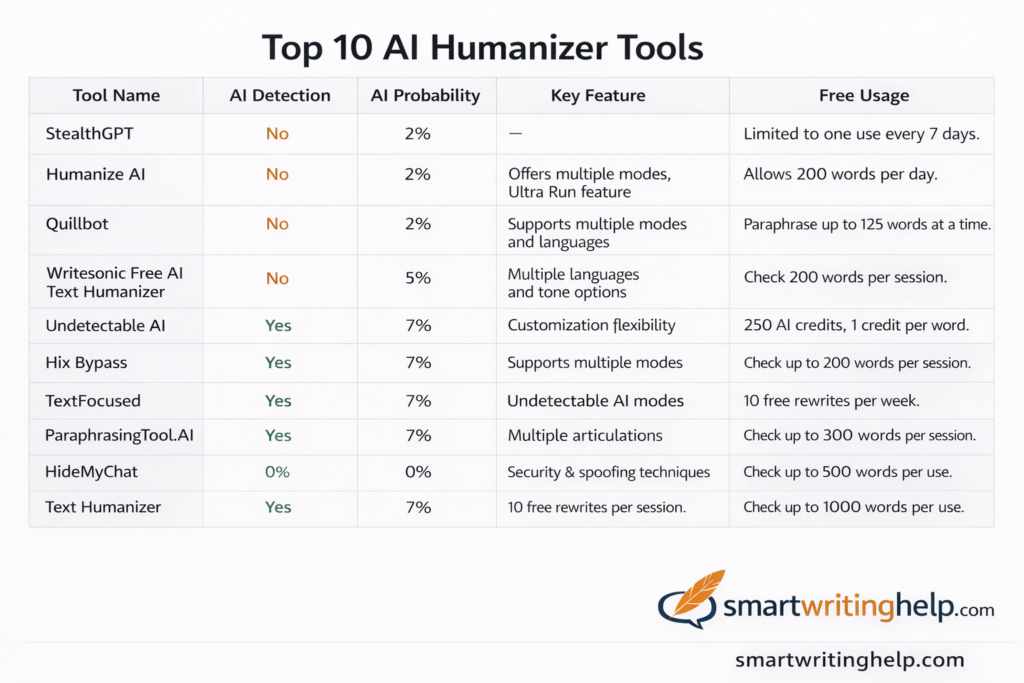
When you’re looking for an AI humanizer that delivers simplicity and efficiency, StealthGPT is a standout option. This tool allows you to easily paste your AI content and transform it into shorter, more natural, and human-like text. Despite having a 350-word input limit, it’s ideal for those who need quick results.
While it lacks features like AI detection, tone selection, or mode options, the output it generates still feels very authentic. Mostly students use ai humanizer tools for making college and university academic essays including assignments without ai detection.
I have personally used StealthGPT to humanize content, and when I tested it with GPTZero, it detected only a 2% probability of the text being AI-generated. This is quite impressive for a tool with minimal customization options.
2-Humanize AI
Humanize AI is a free platform that helps convert AI content into human-like content. It doesn’t require you to create an account, and there are no word limits on the input. It offers multiple modes like Standard, Academic, Simple, Formal, and Informal, which you can choose based on your needs.
For example, the Academic mode is great for college assignments, while Informal is perfect for casual greetings. I liked using the Standard mode the most.
One standout feature of Humanize AI is the Ultra Run option, which makes sure the output remains undetected by all AI detectors.
The changes made to the text are highlighted in orange, while the unedited parts are shown in blue. When I tested the tool with GPTZero, the output had only a 2% AI probability, which is great. Although there is no built-in AI detection, I would recommend this tool to anyone working with various types of content. The free plan lets you check up to 200 words per day.
Tips: Low-Quality AI Content
AI-generated content often lacks natural flow. SmartWritingHelp enhances readability and style, ensuring your content is polished and professional.
3- Quillbot
Quillbot is a popular paraphrasing tool used by over 4.3 million users worldwide. Though it’s not specifically an AI Humanizer, it can help paraphrase AI content into human-like text. To use Quillbot, you just need to paste your content into the text window, which has a limit of 125 words. After that, you can choose a mode—Standard and Fluency are available on the free version. You can also select a language for the output.
Quillbot quickly generates the paraphrased content, and its specialty is transforming text into an easy-to-understand format.
Personally, I love using Quillbot to simplify complex writing. It doesn’t have an in-built AI checker, but when I tested the output with GPTZero, it detected only a 2% chance of being AI content. If you want to simplify complex documents, Quillbot is a great tool to use.
4- Writesonic Free AI Text Humanizer
Writesonic Free AI Text Humanizer is an amazing AI tool, a popular AI writing service.
To use it, simply paste your content into the editor, which has a limit of 200 words for each run. You can then choose from 23 languages and 13+ tones, such as engaging, bold, confident, friendly, and professional.
Although it doesn’t have an in-built AI detector, I tested it with GPTZero, and it showed a 5% AI probability. Overall, the output feels human-like and is ideal for personal projects like social media posts or short messages. The free plan allows you to check up to 200 words at a time.
5- Undetectable AI
Undetectable AI is a tool designed to make your content undetectable by AI detectors. To use it, simply paste your content into the editor window, which allows up to a 15k character limit for input. After that, you can hit the “Check for AI” button to see if AI is detected in your content.
The tool offers several options, such as readability level (University, Journalist, Marketing, Doctorate), purpose (General Writing, Article, Essay, Cover Letter, Report), and AI Model (Basic, Undetectable). It also lets you select your output preference (More Readable, More Balanced, More Human).
The output is automatically checked by major AI detectors like GPTZero, OpenAI, QuillBot, and Copyleaks. When I tested it, GPTZero detected a 7% AI probability. However, the output didn’t feel very human-like and had some punctuation errors, similar to content generated by ChatGPT. If You need any help in writing,
Need Human Paraphrasing? We’ve Got You Covered
6- Hix Bypass
Hix Bypass is a well-known AI humanizer trained on human-written content. It uses advanced algorithms to replicate human-like patterns and avoid AI detection. To use it, simply paste your AI content into the text field. It can check up to 125 words at a time, and a total of 300 words on the free plan.
There are 4 modes to choose from: Fast, Balanced, Aggressive, and Latest. Fast Mode is for quick content generation, while Balanced Mode is for moderate changes. Aggressive Mode makes stronger edits, and Latest Mode uses the newest model to humanize content.
Tips: Why Students Use AI Humanizer Tools
Students need to get quick and well research ready made content for your home work or college essay. But these tools do not give you 100 % humanize content.
7-Humanize AI Text
Humanize AI Text is a platform that adds a human touch to your AI content. You start by pasting your AI text into the editor. After analyzing it, the tool tags the text as either AI-generated or Human Generated. You can select input and output languages from a list of 24 languages.
The tool offers multiple modes such as Shorten, Expand, Simplify, and Improve your writing based on your needs. The Enhanced mode is available as a paid service and comes with two unique settings: Personalize and Goals.
The Personalize setting lets you create a persona and define your audience, while the Goals setting helps adjust tone, clarity, content focus, engagement, and language complexity. However, it doesn’t come with built-in AI detectors. When I tested it with GPTZero, it detected a 7% AI probability in the output.
Overall, the content feels human-like, though it could’ve been more concise, as it expanded my word count by 36 words to convey the same message.
8- BypassGPT
BypassGPT is an AI humanizer trusted by big names like Techradar, Business Insider, and PC World. It lets you create human-like content in just seconds. To use BypassGPT, simply paste your AI content into the text window. The free plan allows you to humanize up to 80 words at a time, making it suitable for small blocks of text.
The tool checks your text with multiple AI detectors such as GPTZero, Copyleaks, and Sapling. You can choose a mode from Fast, Creative, or Enhanced. The Fast mode makes basic changes, Creative mode adds interesting edits, and Enhanced mode helps bypass the strictest content detectors.
However, after testing with Enhanced mode, I was disappointed because 3 of the AI detectors flagged it as 50% AI-generated, while 4 flagged it as 100% AI-generated.
The tool also includes a Daily Check-In system, where you can earn 20 words each day by logging into your BypassGPT account.
Although it didn’t fully succeed in humanizing AI content, it does help make your text more readable, which you can then edit manually to make it more human-like.
9- Ask Your PDF AI Humanizer
AI Humanizer by Ask Your PDF helps you transform your AI content into a more human-friendly form. To use it, simply paste your AI content into the platform.
Then, select the default options such as purpose (general writing), readability (university level), and human level (balanced). After clicking the ‘Humanize Content’ button, it generates 5 different versions of your AI-generated text, from which you can choose the one that feels the most realistic.
However, it doesn’t come with built-in AI detection, and when I tested the output with GPTZero, it detected a 62% possibility of AI content.
10- AI Humanize
Humanize AI, as the name suggests, helps you humanize AI content. To use it, simply enter your text and select the default settings for mode and readability. However, the output produced by Humanize AI doesn’t feel very human-like, as it often comes with long and complex sentences.
Although it doesn’t have in-built AI detection, I tested it with GPTZero, and it detected a 5% AI possibility. The paid plan offers additional features like keyword/phrase lock, aggressive mode, enhanced mode, readability levels, and the option to ‘Show Difference’ between the input and output.
Overall, it’s a good tool with a basic user interface and limited features in the free plan, which allows you to process up to 300 words or 1800 characters.
Conclusion
These tools may be used, but you still won’t get quality content because most of them are paid tools, and users need to subscribe. Even after that, while the content may be humanized, the quality is not very good unless you manually paraphrase it.
I have not used their paid subscriptions yet, but as an academic researcher and scholar, I do not believe in AI-humanized content based on my experience with it. You must hire a human to humanize your content. You can use SmartWritingHelp to get free AI and plagiarized work with human writing.